How a Browser Works: A Beginner-Friendly Guide to Browser Internals
Discover the inner workings of browsers – it's more than just magic
What happens after I type a URL and press Enter


What a browser actually is (beyond “it opens websites”)
A browser is a powerful software platform that does much more than just open websites. It converts machine system and process into human readable format. It includes:
Communicates with servers using internet protocols
Downloads and understands HTML, CSS, and JavaScript
Runs JavaScript code like a mini runtime environment
Converts code into visual pages you can interact with
Main parts of a browser (high-level overview)
User Interface(UI): This is the part of the browser where user interact you can say frontend. Examples: Address Bar, Tabs, Back/Forward.
Browser Engine: It is the controller of the browser. Bridge between UI and all internal components.
Rendering Engine: This is responsible for the rendering of webpages on screen.
JavaScript engine: It manages the interaction on a website
Example: Chrome(V8), Firefox(SpiderMonkey).Storage Layer: This part stores data locally in the user’s browser.

User interface address bar tabs and buttons
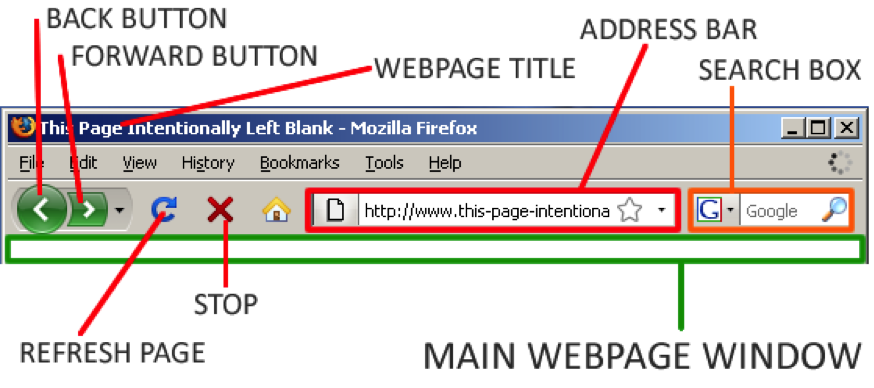
User Interface (UI) in a Browser: The User Interface is the part of the browser that users directly interact with.
It includes:
Address bar – where you type the URL
Tabs – to open multiple websites at once
Buttons – back, forward, reload, bookmark, etc.
Simple definition:
The User Interface is the visible part of the browser that allows users to control and navigate websites.
Browser Engine vs Rendering Engine (simple distinction)
Browser Engine:
Browser engine is a high level component and it act as a controller of the browser. Bridge between UI and all internal components. It is responsible for the high level task like loading URL, navigating back and forward.

Rendering Engine:
Rendering engine is a special component mainly focuses on transforming HTML, CSS, and images into the visual representation you see on the webpage.
Real-life analogy:
Browser Engine = Manager
Rendering Engine = Artist

Networking: how a browser fetch HTML, CSS, JS
These requests for CSS and JS go through these steps:
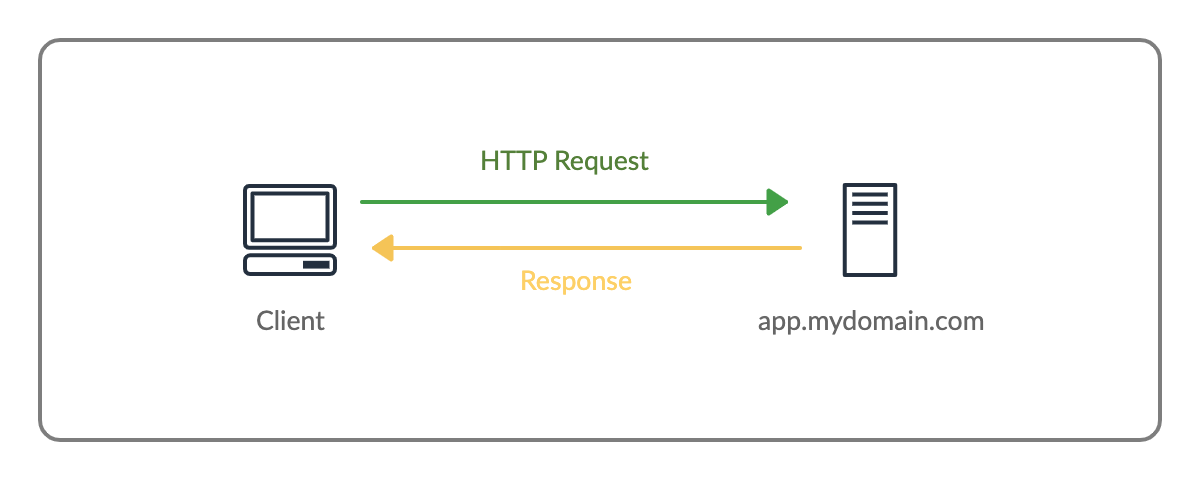
DNS Resolution: When a user type a URL into the browser, the browser needs to find the server’s IP Address.
Connection: A connection is established with the appropriate server. Using 3 way handshake or any other method.
HTTP Request: HTTP (Hypertexts Transfer Protocol the browser sends
Getrequests for specific CSS and JS files.And after these the server responds with the file contents.
HTML parsing and DOM creation
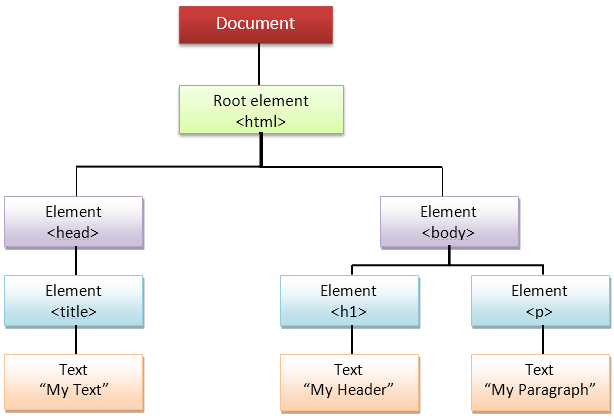
HTML parsing is a process in which a web browser reads an HTML Document and converts it to the internal representation which is known as DOM Document Object Model (DOM).
CSS parsing and CSSOM creation
CSS is also parsed separately just like HTML parsing process the browser read the CSS file and create an internal representation which is known as CSSOM. It allows the browser to know which styles apply to which element.

How DOM and CSSOM come together
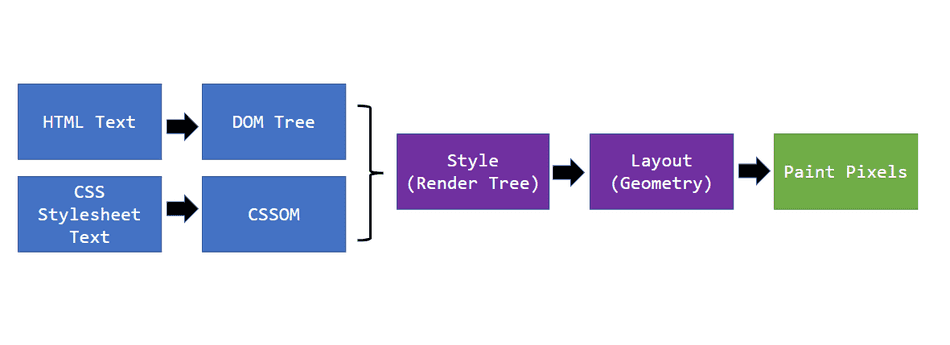
The browser creates the DOM from HTML and the CSSOM from CSS. These two structures are combined to form the Render Tree, which contains only the visible elements along with their computed styles. The render tree is then used for layout and painting to display the webpage.
DOM provides the structure, CSSOM provides the styles, and together they form the Render Tree used to display the page.

Layout (reflow), painting, and display
Layout(reflow), painting and display are critical step in rendering which turn HTML/ CSS into pixels. It is like a mathematical operation, Layout calculates the positions/sizes.
Painting fills the colors effects in pixels.
Display shows the final output.

Very basic idea of parsing (using a simple math example)
Parsing is a simple process of breaking a complex system into parts like any operation like add, sub in mathematical. You have to add two numbers so your brain will think number as different part and operators as a different part, Same goes with HTML and CSS divides into parts and make them working.